Thursday, December 6, 2018

Futurecasting

I have been met with a wealth of useful information and learning experiences this semester both from my courses and on the job. Taking LIS courses while I am in my first year as a school librarian has been very beneficial as I am able to almost immediately apply what I am learning in class. 


Image result for school library clipart

One tip, or rather a frame of mind, I have picked up throughout this course is to keep the students at the heart of the job. I learned about so many tools and resources in this class, from makerspaces to virtual reality, but is in the way the students use these resources that our true purpose lies. Students are not just making neat stuff with magnets and pipe cleaners, they are practicing and gaining skills to help them be collaborative, critical thinkers and problem solvers. Students are not just having fun with VR or AR tools, they are immersed into new perspectives and engaging in meaningful learning experiences. It's not the actual tool or resource that is most important, but what a student can do, where they can go, what skills they can gain, and what learning experiences they have that matters. 


Image result for students learning world clipart

I have also picked up on other useful ideas throughout this course. I plan on using blog shares, social media, and digital curation projects to advocate for the library and support teachers and parents. I will also continue to read relevant literature to stay on top of school librarianship trends. This course has helped to steer me in the right direction as I continue my career in the school library. 

Saturday, November 17, 2018

HelpLightning AR in Education

School librarians aren't just there for the books. So many tools and programs have been brought in to school libraries to enhance student learning and provide opportunities for students to practice and gain skills that have real world applications. As curricular partners within their schools, "librarians are keenly aware of the importance of introducing all modes of material to support the work of the student" (Massis, 2015, p. 798). Makerspaces, coding, and Breakouts are just a few ways school librarians are engaging students in meaningful learning and critical skill building. Another way school librarians can support student learning is through VR & AR. 

Image result for vr ar kids school library

Virtual reality "offers users a 360-degree view of a rendered scene," while "augmented reality superimposes an image, video, or other digital overlay onto a view of the real world in real time" (Goerner, 2016, p. 19). There are many VR and AR apps and tools schools and libraries are incorporating into instruction, including Google Expeditions, Aurasma, Popar, Oculus, Elements 4D, and more. By bringing VR/AR experiences to students, educators are providing "a new tool for student engagement, collaboration, and content creation" (Meyer, 2017). VR/AR have become valuable additions in the toolkit librarians and educators use to engage their students (Massis, 2015). 
Image result for helplightning logo

One AR app that was designed primarily for customer service and technical support is HelpLightning. You can download HelpLightning as a free iOS, Android, or web browser app. When connected with another registered user, you can share virtual video experiences in real time. The idea is that a field expert can virtually reach out and model how to build, repair, etc, whatever the customer needs assistance with. HelpLightning provides several tutorial videos and demos for practical use. Watch this video for a brief overview of how HelpLightning provides merged reality with a virtual interactive presence. 


While not specifically designed for use in a school setting, HelpLightning does have applications for use in education. High school students taking technical classes could connect with an expert in the field rather than rely on the teacher's knowledge for instruction. For example, students interested in computer engineering could connect with someone in the field who could provide a real-time virtual demonstration. The school librarian could coordinate with the teacher to provide opportunities for students to connect with experts in the field they are studying. 

When VR and AR are incorporated in instruction, the experiences provide an "enhance delivery of information" (Massis, 2015, p. 798).  Educators and librarians can bring a whole new level of learning to students. VR and AR can "immerse users into the experience in a way that makes learning more meaningful" (Goerner, 2016, p. 19). 

Image result for ar vr students school learning


Note: I can see how HelpLightning can be beneficial for high school students, but I have not been able to come up with good ideas for use with elementary students. If anyone has any ideas, please share! 


Resources:

Goerner, P. (2016). Augmented reality. What's next? School Library Journal, 62(9), 19-20.

Massis, B. (2015). Using virtual and augmented reality in the library. New Library World, 116(11/12), 796 – 799.

Meyer, L. (2017). Virtually there: Kids are using VR to explore worlds and create new ones. School Library Journal. Retrieved from https://www.slj.com/?detailStory=virtually-kids-using-vr-explore-worlds-create-new-ones

Monday, October 29, 2018

Makerspaces in School


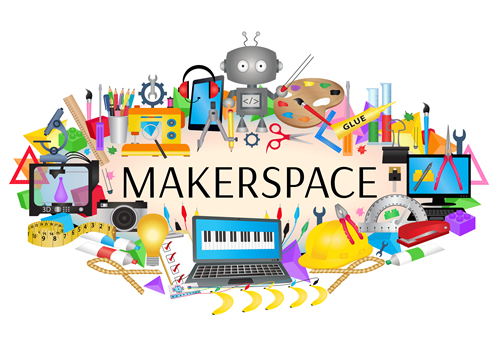
Image result for makerspaceMakerspaces are becoming more and more popular in school libraries across the nation. Makerspaces, as defined in the Makerspace Playbook (2013), are "gathering points where communities of new and experienced makers connect to work on real and personally meaningful projects, informed by helpful mentors and expertise, using new technologies and traditional tools." The tools in a makerspace can range from high-tech to low-tech. For example, a high tech tool might be a 3D printer, while a low-tech tool might be crochet needles and yarn. 


Tamiko Brown is a school librarian who writes about Makerspaces in her blog, Makerspace Library. In a post from November 2017 titled Creating A Mobile Makerspace Library Program, she writes about how school librarians can create makerspace kits for teachers to check out and use in their classrooms. 


Image result for makerspace kits


Colin Angevine and Josh Weisgrau (2015) wrote about the makerspace bandwagon in their post Situating Makerspaces in Schools on Hybrid Pedagogy. They argue that successful implementation of makerspaces should be based on "three values of student learning and empowerment: agency, authenticity, and audience" (2015). Tamiko Brown seems to agree with that idea. In her blog she writes about the importance of student voice and choice with makerspaces, stating that successful makerspace activities "strengthen their independent voice" (Brown, 2017). 
Image result for mobile makerspace elementary school


For school librarians who are already involved in the world of makerspaces, consider taking it a step further by creating makerspace check-out kits for your teachers. Brown provides several suggestions on gathering teacher input, promoting student agency, funding materials, scheduling check-outs, and more. 


Resources:

Brown, T. (2017, November 16). Creating a mobile classroom makerspace library program [Blog post]. Retrieved from http://makerspacelibrary.blogspot.com/2017/11/creating-mobile-classroom-makerspace.html

Angevine, C. & Weisgrau, J. (2015, September 24). Situating makerspaces in schools [Blog post]. Retrieved from http://hybridpedagogy.org/situating-makerspaces-in-schools/


Makerspace Team (2013). Makerspace Playbook [PDF document]. Retrieved from  https://makered.org/wp-content/uploads/2014/09/Makerspace-Playbook-Feb-2013.pdf

Tuesday, October 16, 2018

Cyberbullying


Image result for cyberbullyingBullying is defined as "unwanted, aggressive behavior among school aged children that involves a real or perceived power imbalance. The behavior is repeated, or has the potential to be repeated, over time" ("What is Bullying," 2018).  Many people have experienced bullying in their lives one way or the other. They may have been the victim, the bully, or the bystander. People also may have experienced cyberbullying, which is defined as "bullying that takes place over digital devices like cell phones, computers, and tablets....cylberbulling includes sending, posting, or sharing negative, harmful, false, or mean content about someone else," ("What is Cyberbullying," 2018). 

Educators and other school professionals have a responsibility to keep students safe, which includes helping combat bullying and cyberbullying. Because cyberbullying can occur outside of school, adults may not be aware of the issue. Adults may also lack awareness of cyrberbullying because "many targets choose to suffer in silence rather than report what they are experiencing," (Faucher, Cassidy, Jackson, 2015).

Image result for digital citizenship
Adults who work with children should engage in digital citizenship conversations and activities with students. Digital citizenship is defined as "the norms of appropriate, responsible technology use.... [and] is more than just a teaching tool; it is a way to prepare students/technology users for a society full of technology," (Ribble, 2017).


There are many resources available for educators to assist with digital citizenship education. We must remember, though, that it is not a one-size-fits-all curriculum. Teaching digital citizenship is a deeper concept and it "means embracing the reality that we’re all interconnected through the Internet, and that we therefore need to understand the responsibilities and risks that come with life online," (Hicks, 2015).

Here are a few resources to help get you started with teaching digital citizenship and addressing the topic of cyberbullying:

Image result for cyberbullying research center


Image result for stopbullying.gov


Image result for digital citizenship.net


Image result for common sense education


Resources: 

Faucher, C, Cassidy, W., & Jackson, M. (2015). From the sandbox to the inbox: Comparing the acts, impacts, and solutions of bullying in K-12, higher education, and the workplace. Journal of Education and Training Studies, 3(6), 111-125.

Hicks, K. (2015, July 9). Teacher's guide to digital citizenship [Blog post]. Retrieved from http://www.edudemic.com/teachers-guide-digital-citizenship/

Ribble, M. (2017). Digital citizenship today. Retrieved from http://www.digitalcitizenship.net/home.html

What is Cyberbullying. (2018, July 26). Retrieved from https://www.stopbullying.gov/cyberbullying/what-is-it/index.html

What is Bullying. (2018, July 26). Retrieved from https://www.stopbullying.gov/what-is-bullying/index.html


Wednesday, October 10, 2018

Kahoot!

Image result for test clipart 


Can quizzes be fun?


Actually, yes! Kahoot is a fun way to engage students with quizzes, trivia, and surveys. With Kahoot, answering questions feels more like playing a game than taking a quiz! 


Image result for kahootTo get Kahoot, go to www.kahoot.com and create your free account. You can browse from Kahoot quizzes, polls, surveys, and trivia already created, or create your own questions that meet your specific instructional purposes. Students can use their own devices and go to kahoot.it and enter the specific Kahoot game pin and their name. 


Once the Kahoot game has started, the questions will display on the teacher's screen, preferably something large enough for all students to view such as a Smart Board, Promethean Board, etc. Multiple answers are displayed along with a designated color and shape for each answer. Students respond on their own devices by selecting the color and shape that correlate with their answer choice. 


Image result for kahoot screenshotWhen all answers have been submitted, or time runs out, the results will display on the teacher's screen, giving students prompt feedback on their responses. Students enjoy the fast-paced, friendly-competition atmosphere that Kahoot creates. Teachers enjoy how engaged and enthusiastic students are about testing their knowledge. 


Check out the resources below for more tips, tricks, and ideas 
on how to incorporate Kahoot in your classroom!


 Kahoot 4 Ways To Use In The Class


Introducing the Kahoot! game pin


Resources:

Kesler, C. (2015, October 1). 4 ways to use Kahoot in the classroom. Retrieved from https://www.keslerscience.com/4-ways-to-use-kahoot-in-the-classroom/

Mault, D. (2016, May 11). Using Kahoot in the classroom [Youtube video]. Retrieved from https://www.youtube.com/watch?v=75Pf9stZ1No

Mueller, M. (2017, April 10). 8 ways to use Kahoot! Beyond the basics. Retrieved from https://kahoot.com/blog/2017/04/10/8-ways-use-kahoot-beyond-basics/

What's new at Kahoot! (2018). Retrieved from https://kahoot.com/welcomeback/

Saturday, October 6, 2018

The Described and Captioned Media Program

 School library media specialists serve all students within the school building. This includes students with special needs. There are many adaptive and assistive technology resources that help educators meet the needs of their students. One amazing resource is the Described and Captioned Media Program


Image result for described and captioned media program


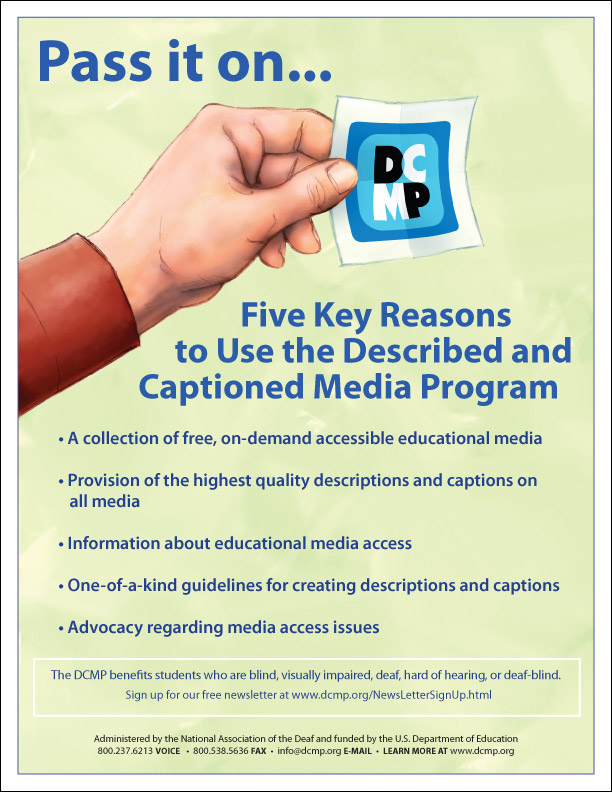
The Described and Captioned Media Program provides educational media designed for students with sensory disabilities. They offer over 5,000 educational videos in the content areas of language arts, mathematics, science, technology, geography, and more, as well as a library of children's literature video presentations. Videos and resources are also offered to families and professionals as learning modules on how to best meet the needs of their students. 

Familes, teachers, and other professionals who serve students with disabilities qualify for free access to all of the DCMP content. There are also some free resources for those whose work may not directly benefit students. The DCMP is funded by the Department of Education and administered by the National Association of the Deaf. 


Image result for described and captioned media program


I am currently awaiting approval for access to DCMP's full selection of content. In the meantime I browsed the free preview section and found high-quality educational videos such as Night of the Context Clues, Climates of the World, and The Math Curse. All students can benefit from DCMP's videos, and those who truly need it are engaged in content designed to meet their needs. 


Image result for described and captioned media program


The Described and Captioned Media Program. (2018). Retrieved from https://dcmp.org/

Saturday, September 29, 2018

Digital Video Cameras in School


Image result for digital video camera canon

Why bother with a digital video camera when you can easily record video with smart phones, iPads, and tablets? Students should have learning experiences with a variety of technology, from high-tech to low-tech. Video cameras may have been more popular before we had wide access to smart devices, but they are not "a thing of the past." Digital video cameras still have a role in teaching and learning in the K-12 environment. 


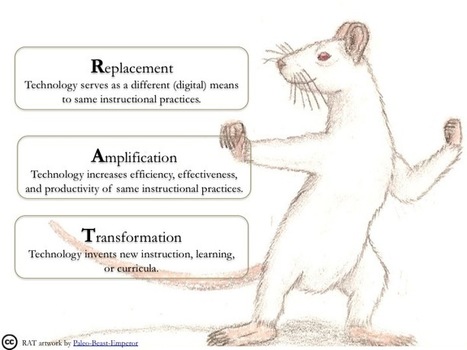
The R.A.T. model, created by Dr. Joan Hughes, can be applied when assessing the use of technology in education. The R.A.T. model "leads you to understand if digital technology is functioning as replacement, amplification, or transformation in educational practice" (Hughes, 2018). 
Image result for r.a.t. technology model replacement amplification transformation


Replacement: same learning outcome with a different format

Amplification: learning task remains the same, but the technology increases the effectiveness and efficiency

Transformation: new learning outcomes are achieved


There are many learning activities to engage in with a digital video camera. Using the camera as a "replacement" to a traditional activity might include student presentations. Rather than have a student present a paper or project in from of the class, students may record themselves with the camera and play the recording for the class. 

Using the digital video camera as "amplification" means the use of the camera somehow enhances or increases the efficiency, effectiveness, and productivity of the activity. If a student is able to view a recording of themselves giving a presentation or reading aloud, he or she may be able to self-evaluate their performance and create a plan for improvement. Another example of using a digital video camera to amplify practices would be to stream live video. Students at my school use a digital video camera to stream the school news live for everyone within the school building to view. Knowing they are streaming live, the students work hard to plan, prepare, and practice their news presentations. 

Digital video cameras could also be used a "transformation" by being able to reach wider audiences. Students could record filed trips, interviews, or other special learning activities and share them with others who were not able to be present for that particular learning event. There may also be opportunities to use a time-lapse option on the camera so students can view the effects of the passage of time for science projects, such as a caterpillar forming a chrysalis and emerging as a butterfly. Another possibility would be for students to film the actual process of a particular project. They could go back to view the process and provide feedback for their teammates and learn from their experiences. 

There are many other ways in which educators can incorporate the use of digital video cameras in teaching and learning in the K-12 environment. Here are two helpful links to get you started:

Using Digital Video in Teaching and Learning
This informative four page document discusses the hardware and software equipment needed to get started with digital video cameras in an educational setting. The process of filming, editing, and other techniques are explained, as well ideas for digital video camera use in the school setting. 

10 Uses for Digital Cameras in the Classroom
Scholastic posted this blog by Meghan Everette explained ten creative uses for videos cameras in the classroom, from digital assessments to yearbooks gone digital. 


Resources:

Hughes, J. (2018). R.A. T. Model. Retrieved from http://techedges.org/r-a-t-model/

Everette, M. (2015, Feb. 2). 10 uses for digital cameras in the classroom. Retrieved from https://www.scholastic.com/teachers/blog-posts/meghan-everette/10-uses-digital-cameras-classroom/

Using digital video in teaching and learning. (2004). Retrieved from http://www.mmiweb.org.uk/publications/ict/UsingDigitalVideo.pdf